



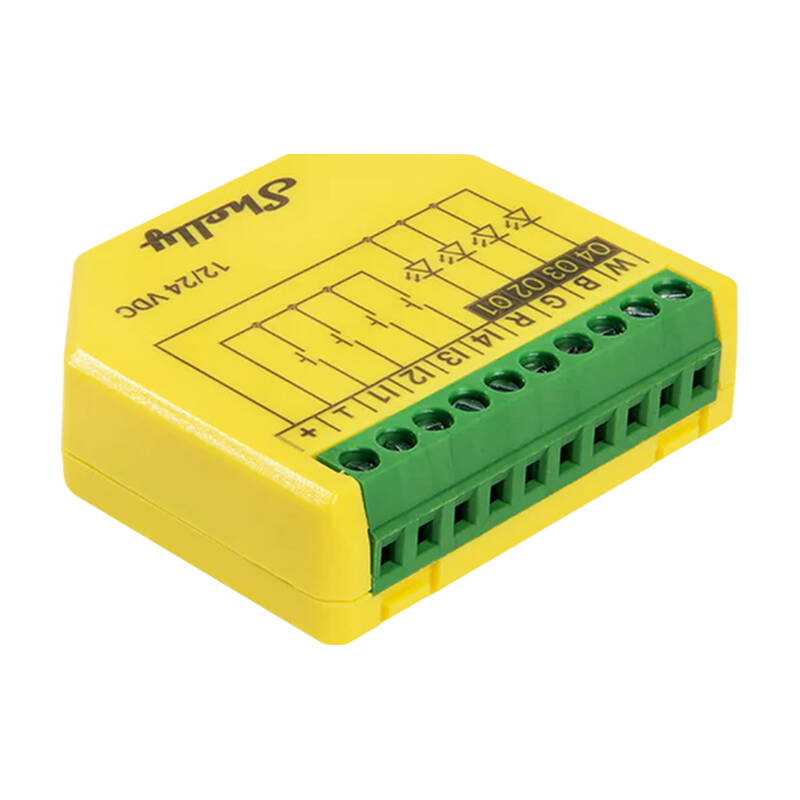
Shelly Plus RGBW PM LED Strip Controller
The Shelly Plus RGBW PM LED Strip Controller is your key to creating a unique atmosphere in your home or office. It supports 12V and 24V LED strips in White, RGB and RGBW modes, allowing you complete freedom of personalization. Subtle light for evening relaxation, dynamic lighting effects at a party or practical kitchen backlighting - you have it all at your fingertips. With no need to install additional hubs, you can start your smart lighting adventure as soon as you plug it in.
Lighting effects that delight
With Shelly Plus RGBW PM, you can give your interior a unique touch. Create the right mood by dimming the light or choosing from 16 million colors. The device also offers unique lighting effects that bring any room to life - from subtle tonal transitions to dynamic color changes.
Smart schedules and scenes
Customize lighting to fit your lifestyle with smart schedules and scenes. The Shelly Plus RGBW PM controller allows you to create personalized schedules that automatically adjust the light to your daily rhythm. Combine it with other Shelly devices to create a comprehensive automation system that fully meets your needs!
Control at your fingertips
With Wi-Fi and Bluetooth support, controlling your lights becomes a breeze. All you need is the Shelly Smart Control app to monitor energy consumption, set night mode or make real-time changes. The device works with the most popular platforms and protocols, as well as voice assistants such as Alexa and Home Assistant. You can also integrate it with your favorite automation system to enjoy full control over your lighting - no matter where you are.
Safety and reliability in one
The device monitors power consumption and has overload protection, which increases safety and helps control costs. The built-in ESP32 processor provides lightning-fast response to every change, so you'll see every setting change right away. The Shelly Plus RGBW PM also acts as a Wi-Fi repeater and BLE gateway, improving the range of your home network.
Manufacturer
Shelly
Model
PlusRGBWPM
Dimensions
42 x 37 x 12 ±0.5 mm
Weight
17 g
Maximum tightening torque of screw terminals
0.2 Nm
Cross section of wires
from 0.1 to 1 mm²
Length of stripped wire
6 mm
Mounting
In a wall box
Housing material
Plastic
Housing color
Yellow
Connector color
Green
Ambient temperature
-20 °C to 40 °C
Humidity
30% - 70%
Power supply
12/24 VDC
Power consumption
< 1,2 W
Maximum control voltage
24 VDC
Maximum control current
4 A per channel (10 A total)
PWM frequency
22 kHz
Voltmeter
0-24 V
Voltmeter accuracy
± 5%
Ammeter
0-10 A
Accuracy of the ammeter
± 10%
Power and energy measurement
Yes
No-load detection threshold
0.5 VA per channel
Built-in temperature sensor
Yes
Wi-Fi range
Up to 30 m indoors, up to 50 m outdoors (depending on local conditions)
Bluetooth version
4.2
Bluetooth range
Up to 10 m indoors, up to 30 m outdoors (depending on local conditions)
Processor
ESP-Shelly C38F
Clock frequency
160 MHz
RAM
400 KB
Flash memory
4 MB
Schedules
20
Webhooks (URL shares)
20 (5 URLs per webhook)
Scripts
Yes
MQTT
Yes
To purchase a product in our online store, select the product you like and add it to your shopping cart. Next, go to the Cart and click on "Checkout" or "Quick order".
When placing a quick order, write your full name, phone number and e-mail. The manager will call you back and clarify the conditions of the order. Based on the results of the conversation, you will receive a confirmation of the registration of the goods by mail or via SMS. Now it remains only to wait for delivery and enjoy the new purchase.
Placing an order in the standard mode is as follows. Completely fill out the form in successive stages: address, delivery method, payment, information about yourself. We advise you to write in the comments to the order information that will help the courier find you. Click the "Checkout" button.
Pay for purchases in a convenient way. There are 3 payment options available in the online store:
- Cash on pickup or delivery by courier. The specialist will contact you on the day of delivery to clarify the time and prepare the change from any banknote in advance. You sign shipping documents, deposit funds, receive goods and a check.
- Cashless payment for self-delivery or registration in the online store: Visa and MasterCard cards. To pay for the purchase, the system will redirect you to the server of the ASSIST system. Here you need to enter the card number, expiration date and the name of the holder.
- Electronic systems for online ordering: PayPal, WebMoney and Yandex.Money. To make a purchase, the system will redirect you to the payment service page. Here you need to fill out the form according to the instructions.
Save time on ordering. There are 4 delivery options available in the online store:
- Courier delivery works from 9.00 to 19.00. When the goods arrive at the warehouse, the courier service will contact you to clarify the details. The specialist will offer to choose a convenient delivery time and specify the address. Inspect the packaging for integrity and compliance with the specified configuration.
- Pickup from the store. A list of outlets to choose from will appear in the shopping cart. When the order arrives at the warehouse, you will receive a notification. To receive an order, contact the employee in the checkout area and give the number.
- Postamat. When the order arrives at the outlet, a unique code will be sent to your phone or e-mail. The order must be paid at the parcel terminal. Shelf life - 3 days.
- Postal delivery via Russian Post. When the order arrives at the branch, a notice of the parcel will be sent to your address. Before paying, you can evaluate the condition of the box: weight, integrity. You can open the box yourself only after paying for the order. One order can contain no more than 10 items and its value should not exceed 100,000 rubles.
An additional tab to place information about the store, delivery, or any other important content. It will help you answer the buyer's questions and dispel his doubts about the purchase. Use it at your discretion.
You can remove it or bring it back by changing one checkbox in the component's settings. Very comfortably.