



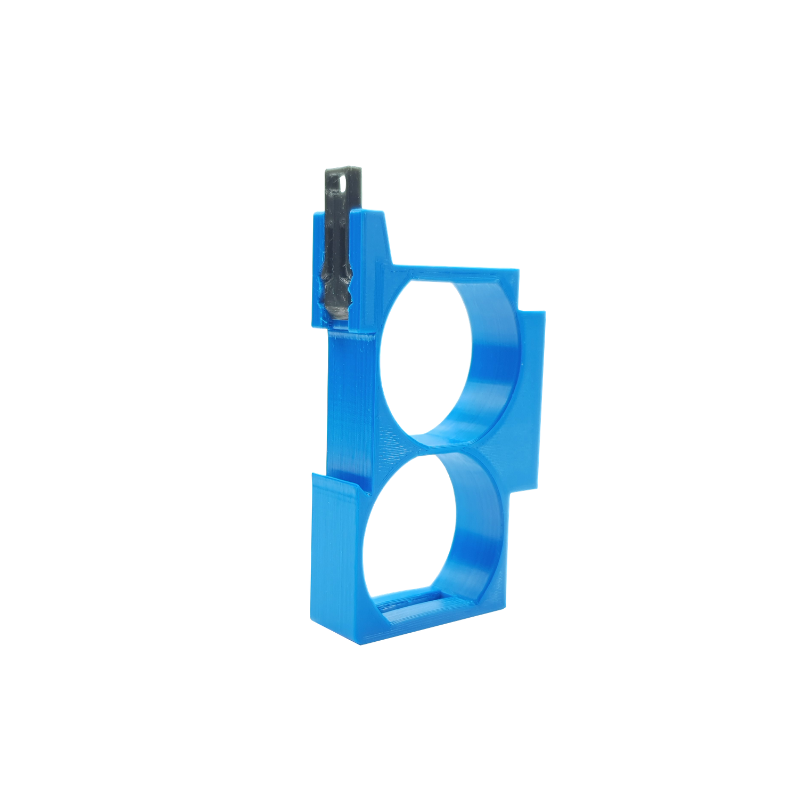
. Double DIN Rail Adapter for Shelly 1 and Shelly 1PM Smart Relay Switches
. The Double DIN Rail Adapter is designed to simplify the installation of Shelly 1 and Shelly 1PM smart relay switches in electrical panels or other DIN rail environments.
. Easy Installation: Simply snap the adapter onto a standard 35mm DIN rail, and then mount the Shelly switch onto the adapter.
. Compact and Convenient: The adapter's compact design allows for easy installation in crowded electrical panels.
. Durable Construction: Made from high-quality materials, the adapter is designed to withstand the rigors of electrical installations.
. Versatile Compatibility: The adapter is compatible with both Shelly 1 and Shelly 1PM smart relay switches.
. Secure Connection: The sturdy design ensures a reliable and secure connection between the switch and the DIN rail.
. With the Double DIN Rail Adapter, you can easily integrate Shelly 1 and Shelly 1PM smart relay switches into your existing electrical infrastructure, providing you with remote control, automation, and energy monitoring capabilities.
To purchase a product in our online store, select the product you like and add it to your shopping cart. Next, go to the Cart and click on "Checkout" or "Quick order".
When placing a quick order, write your full name, phone number and e-mail. The manager will call you back and clarify the conditions of the order. Based on the results of the conversation, you will receive a confirmation of the registration of the goods by mail or via SMS. Now it remains only to wait for delivery and enjoy the new purchase.
Placing an order in the standard mode is as follows. Completely fill out the form in successive stages: address, delivery method, payment, information about yourself. We advise you to write in the comments to the order information that will help the courier find you. Click the "Checkout" button.
Pay for purchases in a convenient way. There are 3 payment options available in the online store:
- Cash on pickup or delivery by courier. The specialist will contact you on the day of delivery to clarify the time and prepare the change from any banknote in advance. You sign shipping documents, deposit funds, receive goods and a check.
- Cashless payment for self-delivery or registration in the online store: Visa and MasterCard cards. To pay for the purchase, the system will redirect you to the server of the ASSIST system. Here you need to enter the card number, expiration date and the name of the holder.
- Electronic systems for online ordering: PayPal, WebMoney and Yandex.Money. To make a purchase, the system will redirect you to the payment service page. Here you need to fill out the form according to the instructions.
Save time on ordering. There are 4 delivery options available in the online store:
- Courier delivery works from 9.00 to 19.00. When the goods arrive at the warehouse, the courier service will contact you to clarify the details. The specialist will offer to choose a convenient delivery time and specify the address. Inspect the packaging for integrity and compliance with the specified configuration.
- Pickup from the store. A list of outlets to choose from will appear in the shopping cart. When the order arrives at the warehouse, you will receive a notification. To receive an order, contact the employee in the checkout area and give the number.
- Postamat. When the order arrives at the outlet, a unique code will be sent to your phone or e-mail. The order must be paid at the parcel terminal. Shelf life - 3 days.
- Postal delivery via Russian Post. When the order arrives at the branch, a notice of the parcel will be sent to your address. Before paying, you can evaluate the condition of the box: weight, integrity. You can open the box yourself only after paying for the order. One order can contain no more than 10 items and its value should not exceed 100,000 rubles.
An additional tab to place information about the store, delivery, or any other important content. It will help you answer the buyer's questions and dispel his doubts about the purchase. Use it at your discretion.
You can remove it or bring it back by changing one checkbox in the component's settings. Very comfortably.