



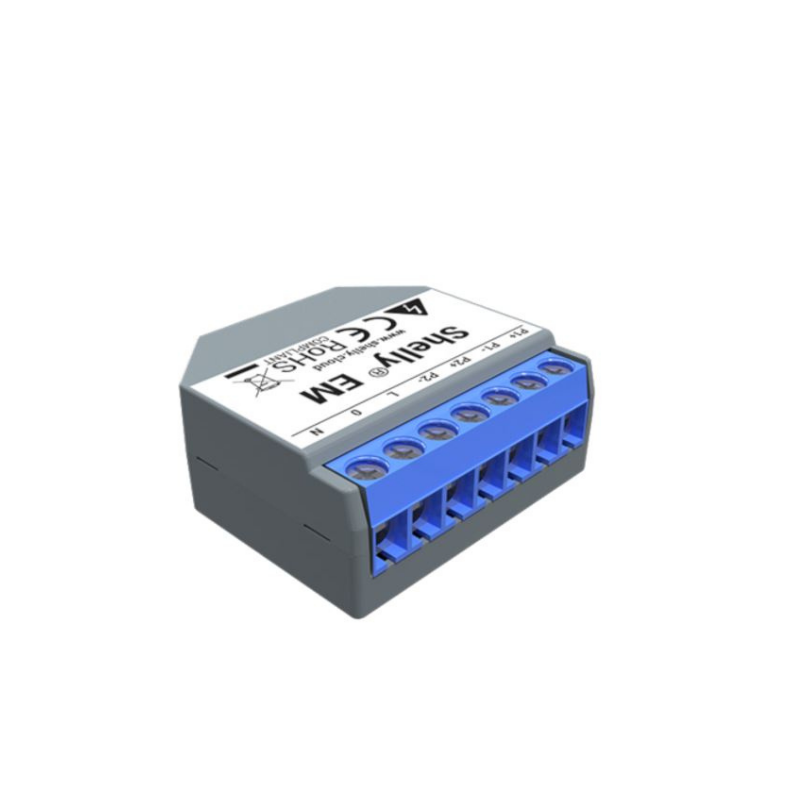
Shelly EM is Shelly's single phase power meter for recommended for both home and corporate use. Shelly ЕМ can monitor energy consumption in real time in 2 points simultaneously (up to 120A each). With Shelly EM you can also measure how much energy your solar system produces and the power consumption at the same time.
365 day built-in energy history.
We developed Shelly ЕМ to allow you to monitor the status and history, as well as the current and past electrical power consumption for the day, week, month or year.
Small size full of functionalities: Intelligently designed to fit in most standard electrical boxes and switches. Shelly EM is smaller than cookies stacked together.
It can automatically turn off the whole circuit if consumption or energy (pre-paid energy option) reaches the set limit and has integrated relay output made for contactor control.
Detailed info about electricity consumption: With Shelly EM, you can view the quality of your energy etwork regarding active power, reactive power, voltage, and power factor. Monitor your facility or home to avoid additional expenses or drastic drops in energy that may damage your appliances and machines.
- 110-230V ±10, 50/60Hz AC, Shelly EM is compatible with all major international voltage standards.
- Small size: 39x36x17mm
- equipped with built-in Wi-Fi
- precise power meter with 1% accuracy
- MQTT, rest API support
- Monthly expenses
- 365 days consumption history stored on the device
- User friendly charts
- Detailed report downloadable in csv
- Relay output for contactor control: 2 A / 230 VAC / 50/60 Hz
Measurements:
- 2 x consumption (W),
- 1 x current (A)
- 1 x voltage (V)
- 2 x energy (Wh), consumed energy from power grid
- 2 x energy (Wh), generated energy from a photovoltaic system
- 2 x reactive power (Var)
WiFi connection:
- Shelly EM - similarly to other Shelly devices - has a built-in web server, that is, can work in Access Point mode.
- It can connect to home or corporate WiFi etwork and be managed from the free Shelly Cloud app (available for Android and iOS)
- No eed for gateway, controller or hub, it connects directly to WiFi as a WiFi client or access point
- Supported WiFi protocols: 802.11 b / g / (2.4 GHz)
- Can work as a standalone device or connected to Shelly's Cloud
- Turn devices on/off directly from your smartphone or tablet. You can manage Shelly EM output from Shelly app, MQTT or Rest API
- On home etworks it seamlessly integrates with home automation systems via HTTP and/or UDP protocols
Safety:
- overpower control
Scheduling, timers:
- Choose a time and create custom daily schedules for your devices.
- Auto turn on and off by hour or sunset and sunrise.
For developers:
- Its facotry firmware supports integration to various home automation systems.
- You can manage ShellyEM output from Shelly app, MQTT or Rest API.
- REST API documentation can be found here:
ReviewsReviewLoading...
To purchase a product in our online store, select the product you like and add it to your shopping cart. Next, go to the Cart and click on "Checkout" or "Quick order".
When placing a quick order, write your full name, phone number and e-mail. The manager will call you back and clarify the conditions of the order. Based on the results of the conversation, you will receive a confirmation of the registration of the goods by mail or via SMS. Now it remains only to wait for delivery and enjoy the new purchase.
Placing an order in the standard mode is as follows. Completely fill out the form in successive stages: address, delivery method, payment, information about yourself. We advise you to write in the comments to the order information that will help the courier find you. Click the "Checkout" button.
Pay for purchases in a convenient way. There are 3 payment options available in the online store:
- Cash on pickup or delivery by courier. The specialist will contact you on the day of delivery to clarify the time and prepare the change from any banknote in advance. You sign shipping documents, deposit funds, receive goods and a check.
- Cashless payment for self-delivery or registration in the online store: Visa and MasterCard cards. To pay for the purchase, the system will redirect you to the server of the ASSIST system. Here you need to enter the card number, expiration date and the name of the holder.
- Electronic systems for online ordering: PayPal, WebMoney and Yandex.Money. To make a purchase, the system will redirect you to the payment service page. Here you need to fill out the form according to the instructions.
Save time on ordering. There are 4 delivery options available in the online store:
- Courier delivery works from 9.00 to 19.00. When the goods arrive at the warehouse, the courier service will contact you to clarify the details. The specialist will offer to choose a convenient delivery time and specify the address. Inspect the packaging for integrity and compliance with the specified configuration.
- Pickup from the store. A list of outlets to choose from will appear in the shopping cart. When the order arrives at the warehouse, you will receive a notification. To receive an order, contact the employee in the checkout area and give the number.
- Postamat. When the order arrives at the outlet, a unique code will be sent to your phone or e-mail. The order must be paid at the parcel terminal. Shelf life - 3 days.
- Postal delivery via Russian Post. When the order arrives at the branch, a notice of the parcel will be sent to your address. Before paying, you can evaluate the condition of the box: weight, integrity. You can open the box yourself only after paying for the order. One order can contain no more than 10 items and its value should not exceed 100,000 rubles.
An additional tab to place information about the store, delivery, or any other important content. It will help you answer the buyer's questions and dispel his doubts about the purchase. Use it at your discretion.
You can remove it or bring it back by changing one checkbox in the component's settings. Very comfortably.