



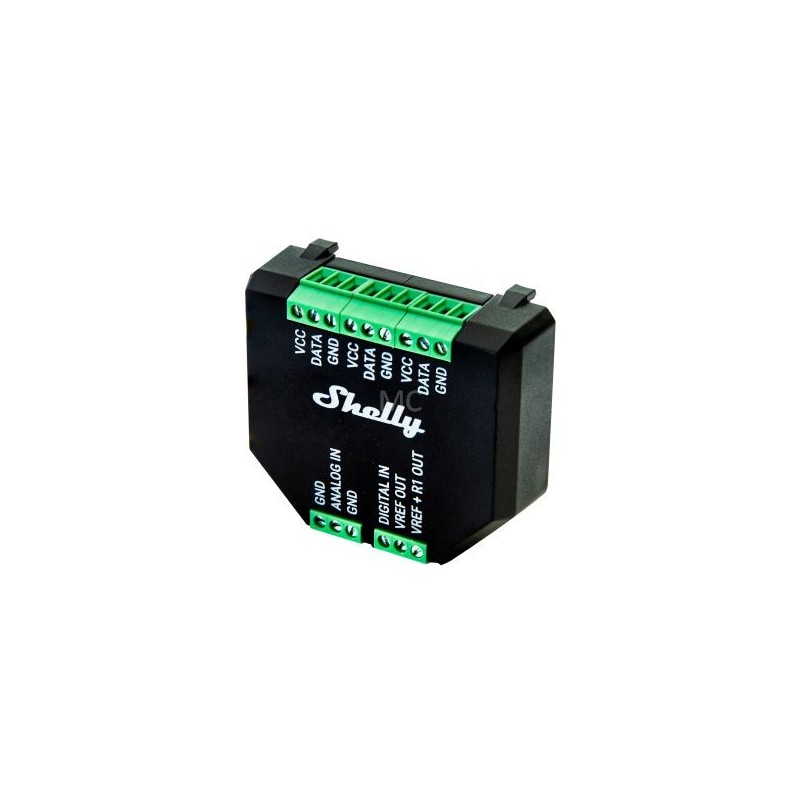
Shelly's PLUS sensor addon is compatible with Shelly PLUS series relays (Shelly PLUS 1, Shelly PLUS 1PM, Shelly PLUS 2PM) and PLUS i4 input module, and is making the smart devices capable of connecting to analogue and digital sensors.. Features:. It has ananalogand adigital input. It can be used with up to five DS18B20 sensors or one DHT22 sensor DS18B20 - Temperature sensor (up to 5),. DHT22 sensor- if you want to monitortemperature and humidity WHY SHELLY PLUS ADD-ON? It measures and control with precision:Shelly Plus Add-on is a galvanically isolated sensor interface for all Shelly Plus relays. Use it to measure temperature and humidity using its 1-Wire terminals, or connect various analog and digital sensors for complex automation and higher efficiency. HIGH COMPATIBILITY WITH SENSORS Highly compatible Shelly Plus Add-on is compatible with most Arduino sensors! Use its digital or analog inputs to measure your desired parameters and create complex automation scenes based on the sensor data.. USE CASES. Garage door position:When paired with a Shelly Plus 1, you can connect a reed-switch sensor to Shelly Plus Addon's digital sensor and follow the state of your garage door. This way, you will always know whether it is open or closed when you're away and take appropriate action. Control aquarium water heating: Using Shelly Plus Add-on and two DS18B20 sensors, you can easily measure the precise temperature inside your aquarium, as well as the room temperature. Based on this data, you can maintain a comfortable and healthy environment for your pets. Additionally, you can connect a liquid level sensor to the Add-on, and always be sure that the water level is at its optimal level. Control your lights based on luminousity: together with an LDR (photoresistor), Shelly Plus Add-on can trigger a Shelly Plus 2PM to open the blinds when the room is too dark and it's still daytime. Additionally, when luminosity is low, Shelly Plus Add-on can trigger a Shelly Plus 1 to turn on the lights at just the right time. Follow the weather:Outdoor motorized awnings and shaders offer pleasant shade for your guests on sunny days. However, a strong, unexcepted wind can damage them beyond repair. By combining it with a wind sensor connected to the Shelly Plus AddOn, Shelly Plus 2PM can automatically close the outside awning to protect them from the wind. Additionally, Shelly Plus Add-on with a rain sensor can trigger Shelly Plus 2PM to open the awning just in time to protect your guests. Irrigation only when eeded:Having a beautiful garden is ot an easy task and automating your irrigation system can save you time and optimize your costs. Together with a soil moisture sensor, Shelly Plus Add-on can trigger Shelly Plus 1 to turn on the irrigation only when ecessary, always skipping the rainy days. Motion-controlled lights:Shelly Plus Add-on can also be connected to a PIR sensor to light up rooms that you occasionally use around the house. This way, when you enter the room, the light will come on for as long as you eed it to.
To purchase a product in our online store, select the product you like and add it to your shopping cart. Next, go to the Cart and click on "Checkout" or "Quick order".
When placing a quick order, write your full name, phone number and e-mail. The manager will call you back and clarify the conditions of the order. Based on the results of the conversation, you will receive a confirmation of the registration of the goods by mail or via SMS. Now it remains only to wait for delivery and enjoy the new purchase.
Placing an order in the standard mode is as follows. Completely fill out the form in successive stages: address, delivery method, payment, information about yourself. We advise you to write in the comments to the order information that will help the courier find you. Click the "Checkout" button.
Pay for purchases in a convenient way. There are 3 payment options available in the online store:
- Cash on pickup or delivery by courier. The specialist will contact you on the day of delivery to clarify the time and prepare the change from any banknote in advance. You sign shipping documents, deposit funds, receive goods and a check.
- Cashless payment for self-delivery or registration in the online store: Visa and MasterCard cards. To pay for the purchase, the system will redirect you to the server of the ASSIST system. Here you need to enter the card number, expiration date and the name of the holder.
- Electronic systems for online ordering: PayPal, WebMoney and Yandex.Money. To make a purchase, the system will redirect you to the payment service page. Here you need to fill out the form according to the instructions.
Save time on ordering. There are 4 delivery options available in the online store:
- Courier delivery works from 9.00 to 19.00. When the goods arrive at the warehouse, the courier service will contact you to clarify the details. The specialist will offer to choose a convenient delivery time and specify the address. Inspect the packaging for integrity and compliance with the specified configuration.
- Pickup from the store. A list of outlets to choose from will appear in the shopping cart. When the order arrives at the warehouse, you will receive a notification. To receive an order, contact the employee in the checkout area and give the number.
- Postamat. When the order arrives at the outlet, a unique code will be sent to your phone or e-mail. The order must be paid at the parcel terminal. Shelf life - 3 days.
- Postal delivery via Russian Post. When the order arrives at the branch, a notice of the parcel will be sent to your address. Before paying, you can evaluate the condition of the box: weight, integrity. You can open the box yourself only after paying for the order. One order can contain no more than 10 items and its value should not exceed 100,000 rubles.
An additional tab to place information about the store, delivery, or any other important content. It will help you answer the buyer's questions and dispel his doubts about the purchase. Use it at your discretion.
You can remove it or bring it back by changing one checkbox in the component's settings. Very comfortably.