



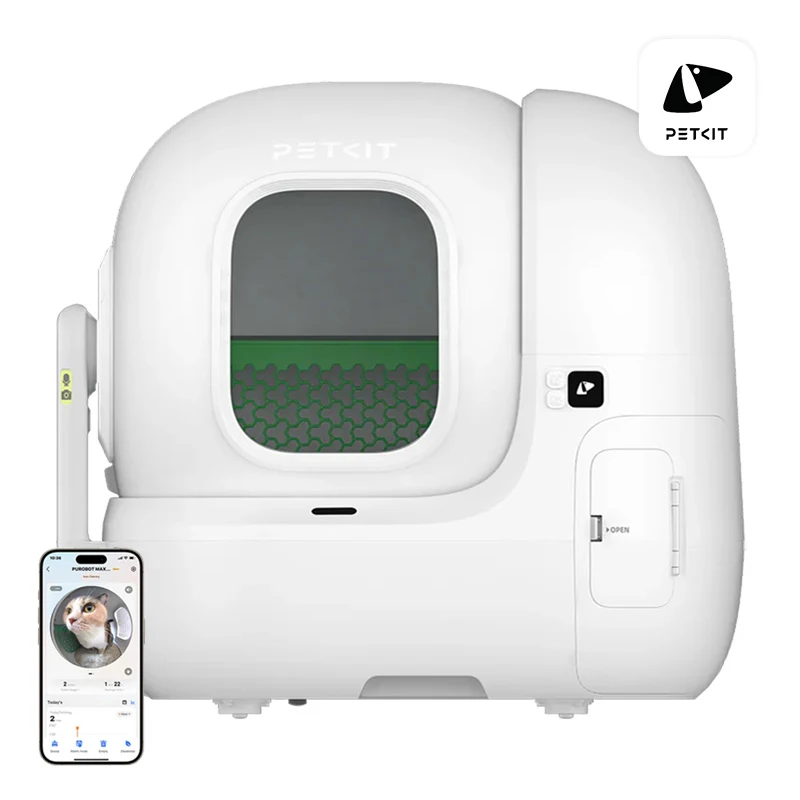
PetKit Purbot MAX PRO intelligent self-cleaning cat litter box with AI camera.
The PetKit Purbot MAX PRO smart cat litter box is a revolutionary solution that not only facilitates the daily care of your cat, but also provides full control over its health. With a built-in smart camera and advanced features, the litter box monitors your pet, creating detailed reports on its toilet habits and health. A special system records photos of feces and lumps of litter to help identify potential urinary or digestive problems.
Ideal for many cats
The Purbot MAX PRO is perfect for homes with more than one cat. Using a combination of weight recognition and AI technology, the litter box identifies each cat, even if their weights are similar. With the PETKIT app, you'll gain access to your pets' individual profiles, tracking their litter box visits, weight changes, and urinary and digestive health.
Full control and live viewing
Stay on top of your cat's activity with the 24/7 live streaming feature, which allows you to view your cat's litter box in real time, even at night thanks to the infrared mode. You can customize the camera's settings, including its hours of operation, to ensure complete privacy.
Hygiene at the highest level
The automated string waste packing system allows hygienic disposal of feces without contact. With a large 8-liter waste container, the litter box can run for up to 17 days without needing to be emptied - ideal for frequent travelers. The triple odor control system guarantees freshness for up to 45 days.
Safety and convenience of use
Purbot MAX PRO is not only comfortable, but also safe for your cat. Anti-jam patents, 12 built-in safety sensors and seamless design prevent leaks, ensuring safe and stress-free use of the litter box. The wide entrance and spacious 76-liter capacity make the unit suitable for cats of all sizes.
Designed for silence and efficiency
With a noise level of just 35 dB, the litter box provides a quiet atmosphere for both you and your cat. With replaceable strainers, Purbot MAX PRO is compatible with 99% of clumping litter types, minimizing litter consumption and ensuring optimal cleanliness.
PETKIT app - everything under control
With the PETKIT app, you can control your litter box from anywhere, selecting automatic cleaning styles, deodorization options and many other settings. Notifications on your phone keep you informed about your cat's visits and the status of the device.
Included
litter box
magnetic litter remover
x2 litter screen
Breezy smart odor remover with N60 cartridge
odor absorber N50 2.0
railing to prevent spillage of litter
adapter
waste bag
instruction manual
Litter box
Manufacturer
PetKit
Model
P9904
Connection to the application
Wi-Fi 2.4 GHz / 5 GHz
Dimensions
657 × 538 × 603 mm
Input height
250 mm
Weight
approximately 11 kg
Power supply parameters
12V⎓2A
Construction materials
PP, ABS, TPE, silicone
Intended use
For cats over 6 months old and weighing more than 1.5 kg
Camera
Video resolution
1080p HD
Field of view
210°
Focal length
1.12 mm (0.04 in)
Waterproof
IPX5
Audio
microphone
To purchase a product in our online store, select the product you like and add it to your shopping cart. Next, go to the Cart and click on "Checkout" or "Quick order".
When placing a quick order, write your full name, phone number and e-mail. The manager will call you back and clarify the conditions of the order. Based on the results of the conversation, you will receive a confirmation of the registration of the goods by mail or via SMS. Now it remains only to wait for delivery and enjoy the new purchase.
Placing an order in the standard mode is as follows. Completely fill out the form in successive stages: address, delivery method, payment, information about yourself. We advise you to write in the comments to the order information that will help the courier find you. Click the "Checkout" button.
Pay for purchases in a convenient way. There are 3 payment options available in the online store:
- Cash on pickup or delivery by courier. The specialist will contact you on the day of delivery to clarify the time and prepare the change from any banknote in advance. You sign shipping documents, deposit funds, receive goods and a check.
- Cashless payment for self-delivery or registration in the online store: Visa and MasterCard cards. To pay for the purchase, the system will redirect you to the server of the ASSIST system. Here you need to enter the card number, expiration date and the name of the holder.
- Electronic systems for online ordering: PayPal, WebMoney and Yandex.Money. To make a purchase, the system will redirect you to the payment service page. Here you need to fill out the form according to the instructions.
Save time on ordering. There are 4 delivery options available in the online store:
- Courier delivery works from 9.00 to 19.00. When the goods arrive at the warehouse, the courier service will contact you to clarify the details. The specialist will offer to choose a convenient delivery time and specify the address. Inspect the packaging for integrity and compliance with the specified configuration.
- Pickup from the store. A list of outlets to choose from will appear in the shopping cart. When the order arrives at the warehouse, you will receive a notification. To receive an order, contact the employee in the checkout area and give the number.
- Postamat. When the order arrives at the outlet, a unique code will be sent to your phone or e-mail. The order must be paid at the parcel terminal. Shelf life - 3 days.
- Postal delivery via Russian Post. When the order arrives at the branch, a notice of the parcel will be sent to your address. Before paying, you can evaluate the condition of the box: weight, integrity. You can open the box yourself only after paying for the order. One order can contain no more than 10 items and its value should not exceed 100,000 rubles.
An additional tab to place information about the store, delivery, or any other important content. It will help you answer the buyer's questions and dispel his doubts about the purchase. Use it at your discretion.
You can remove it or bring it back by changing one checkbox in the component's settings. Very comfortably.