



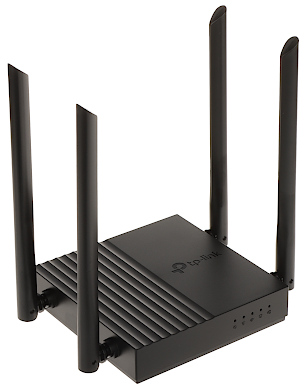
| Frequency range: | 2.4 GHz, 5 GHz |
| Antenna type: | 4 x Omnidirectional antenna - Integrated |
| Standards: | IEEE 802.11 b/g/n @ 2.4 GHz IEEE 802.11 a/n/ac @ 5 GHz |
| Baud rates: | 400 Mbps + 867 Mbps |
| LAN ports: | 4 x 10/100/1000 Mbps LAN 1 x 10/100/1000 Mbps Uplink |
| LED indicators: | Power, 2.4 GHz WLAN, 5 GHz WLAN, Ethernet, WAN |
| Receiver sensitivity: | 2.4 GHz : • 11g 6M : -96 dBm • 11g 54M : -78 dBm • 11n HT20 MCS7 : -77 dBm • 11n HT40 MCS7 : -74 dBm • 11ac VHT20 MCS8 : -73 dBm • 11ac VHT40 MCS9 : -68 dBm 5 GHz : • 11a 6M : -95 dBm • 11a 54M : -77 dBm • 11ac VHT20 MCS8 : -71 dBm • 11ac VHT40 MCS9 : -67 dBm • 11ac VHT80 MCS9 : -63 dBm |
| DDNS: | + |
| DHCP server: | + |
| Firmware update: | + |
| Protections: | WEP 64/128-bit, WPA/WPA2, WPA-PSK/WPA2-PSK DoS attacks protection, SPI etwork firewall, domain filtering, IP and MAC filtering, IP and MAC binding |
| Management interface: | Web browser, TP-LINK Tether |
| Transmitter power: | max. 20 dBm @ 2.4 GHz max. 23 dBm @ 5 GHz |
| Power supply: | 12 V DC / 1.5 A (power adapter included) |
| Main features: | • MU-MIMO - a multi-antenna transmission function that allows to increase the bandwidth and reliability of connection with the client of the etwork • Beamforming (TxBF) - technology that allows to create a beam of radio waves in order to improve the quality of connection with client devices located further away from the signal source • Airtime Fairness - technology that improves etwork performance when multiple clients with different data rates appear in it • Firewall • Internet access filtering • Static / dynamic routing • Built-in 4-port switch • Access Point • The WPS function allows to easy establish an encrypted connection • QoS • Access control • Remote management • DMZ • UPnP • Port forwarding • parental control • Guest Network - a separate and secure etwork for guests • DHCP client list • VPN etworks: Open VPN, PPTP VPN • SSID hiding • IPv6 compliance • Smooth transmission in HD quality - IGMP Proxy/Snooping, Bridge VLAN, Tag VLAN functions contribute to optimal IPTV transmission |
| Operation temp: | 0 °C ... 40 °C |
| Permissible relative humidity: | 10 % ... 90 % (non-condensing) |
| Weight: | 0.23 kg |
| Dimensions: | 120 x 120 x 28 mm |
| Manufacturer / Brand: | TP-LINK |
To purchase a product in our online store, select the product you like and add it to your shopping cart. Next, go to the Cart and click on "Checkout" or "Quick order".
When placing a quick order, write your full name, phone number and e-mail. The manager will call you back and clarify the conditions of the order. Based on the results of the conversation, you will receive a confirmation of the registration of the goods by mail or via SMS. Now it remains only to wait for delivery and enjoy the new purchase.
Placing an order in the standard mode is as follows. Completely fill out the form in successive stages: address, delivery method, payment, information about yourself. We advise you to write in the comments to the order information that will help the courier find you. Click the "Checkout" button.
Pay for purchases in a convenient way. There are 3 payment options available in the online store:
- Cash on pickup or delivery by courier. The specialist will contact you on the day of delivery to clarify the time and prepare the change from any banknote in advance. You sign shipping documents, deposit funds, receive goods and a check.
- Cashless payment for self-delivery or registration in the online store: Visa and MasterCard cards. To pay for the purchase, the system will redirect you to the server of the ASSIST system. Here you need to enter the card number, expiration date and the name of the holder.
- Electronic systems for online ordering: PayPal, WebMoney and Yandex.Money. To make a purchase, the system will redirect you to the payment service page. Here you need to fill out the form according to the instructions.
Save time on ordering. There are 4 delivery options available in the online store:
- Courier delivery works from 9.00 to 19.00. When the goods arrive at the warehouse, the courier service will contact you to clarify the details. The specialist will offer to choose a convenient delivery time and specify the address. Inspect the packaging for integrity and compliance with the specified configuration.
- Pickup from the store. A list of outlets to choose from will appear in the shopping cart. When the order arrives at the warehouse, you will receive a notification. To receive an order, contact the employee in the checkout area and give the number.
- Postamat. When the order arrives at the outlet, a unique code will be sent to your phone or e-mail. The order must be paid at the parcel terminal. Shelf life - 3 days.
- Postal delivery via Russian Post. When the order arrives at the branch, a notice of the parcel will be sent to your address. Before paying, you can evaluate the condition of the box: weight, integrity. You can open the box yourself only after paying for the order. One order can contain no more than 10 items and its value should not exceed 100,000 rubles.
An additional tab to place information about the store, delivery, or any other important content. It will help you answer the buyer's questions and dispel his doubts about the purchase. Use it at your discretion.
You can remove it or bring it back by changing one checkbox in the component's settings. Very comfortably.